
The KEWTECH KT200 digital clamp meter complies with international safety standard IEC61010. It features data hold function, convenient range switching, sleep function to conserve battery power, etc. The clamp is integrated into the insulation layer for safer testing.
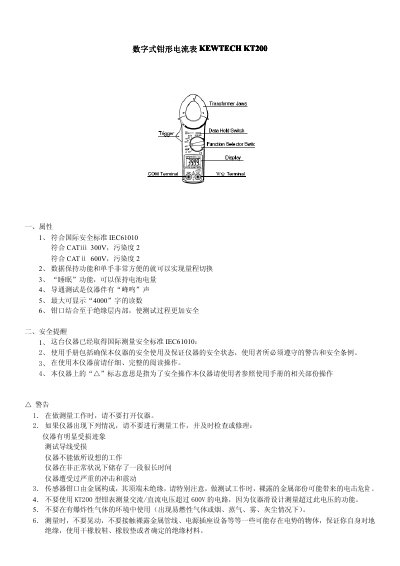
The KEWTECH KT200 is a digital clamp meter designed for measuring AC and DC current, AC and DC voltage, and resistance. It features an automatic ranging function, a data hold capability, and a sleep mode to conserve battery power. The device complies with international safety standards IEC 61010 and is rated for CAT III 300V and CAT II 600V environments. This manual is written in Chinese.
| Safety Standard | IEC 61010 |
|---|---|
| CAT Rating | CAT III 300V, CAT II 600V |
| Max Display Digits | 3999 |
| Battery Type | 2 x R03 |
| Jaw Opening | 30mm |
| Dimensions | 184 x 44 x 27 mm |
Set the Power/Data Hold switch to the 'DATE HOLD' position to lock the display reading.
The screen will display 'BATT' at the bottom left corner to indicate low battery.
No, the manual explicitly warns not to use the KT200 to measure AC/DC voltage exceeding 600V using the clamp jaws.