
This document provides instructions for installing and using a wireless leash, including battery installation, connection, and usage.
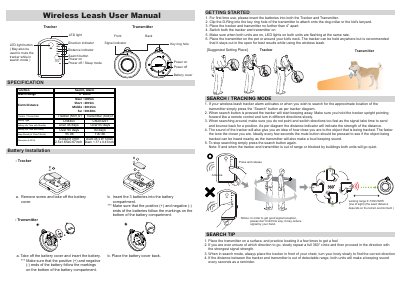
This manual provides instructions for the Wireless Leash system, which consists of a Tracker (M01) and a Transmitter (S04). It details the initial setup process, including battery installation and pairing the units. The guide explains how to use the device in Search and Tracking modes to locate the transmitter or pet, utilizing LED indicators and audio beeps to determine proximity.
| Working Range | 0~100m/320ft (line of sight) |
|---|---|
| Alarm Search Range | 0~100m |
| Battery Type (Tracker) | LR44x3 |
| Battery Type (Transmitter) | CR2032x1 |
| Battery Life (Standby) | Over 45 days (Tracker) / Over 60 days (Transmitter) |
| Operating Temperature | 14 ℉ ~149℉ (-10 ˚C~65 ˚C) |
| Beep Sound (at 10cm) | 95 db (Tracker) / 100 db (Transmitter) |
To change the range settings, press the search button and follow the LED light indication to set the desired range.
If the units are out of range or blocked, both units will go quiet, or the tracker LED will stay on for one minute before going to sleep mode.
Press and hold the LED light button on the tracker unit to activate the panic alert.