
Sony PS Vita PCH-1004/PCH-1104 Quick Start Guide

This document provides instructions on how to use the PlayStation®Vita system, including inserting memory cards, setting language and network connection.
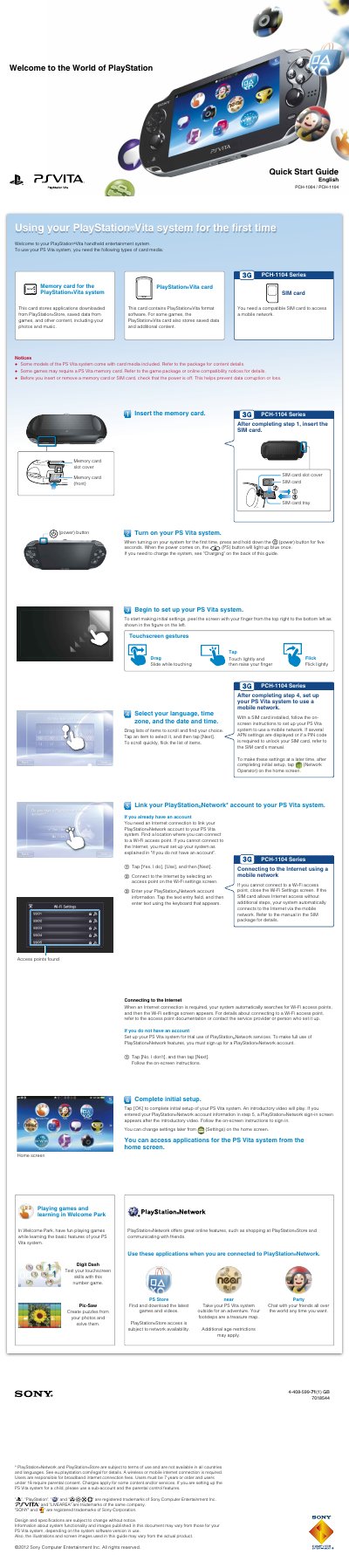

Sony PS Vita PCH-1004/PCH-1104 Quick Start Guide - cover page
Brand
PSVITA
Category
Other Electronics
Document type
User Manual
Language
English
Pages
2
File format
PDF
File size
1 MB
Published
09 August, 2012
Updated
28 September, 2023
MD5 checksum
58928DD43E1B8FB05597686943DE02B2

About this manual

This guide provides initial setup instructions for the Sony PS Vita handheld entertainment system, including inserting memory cards and SIM cards, linking a PlayStation Network account, and connecting to the internet. It covers basic touchscreen gestures and navigating the home screen.

What's inside

  • Welcome to the World of PlayStation
  • Memory card and SIM card
  • Touchscreen gestures
  • Initial settings
  • Linking PlayStation Network account
  • Connecting to the Internet
  • Playing games
  • Saving data
  • Charging
  • Safety Guide

Specifications

Document ModelPCH-1004 / PCH-1104
Minimum Age7 years or older

Frequently asked questions

How do I turn on the PS Vita for the first time?

Press and hold down the power button for five seconds until the PS button lights up blue.

How long must you hold the power button to turn on the PS Vita system for the first time?

You must press and hold down the power button for five seconds.

How long must you hold the power button to turn the system off completely?

Press and hold the power button for two seconds, then tap Power Off.

Download PDF (1 MB)