
CellShield is a battery protection device that can prevent over-discharge and overheating of batteries.
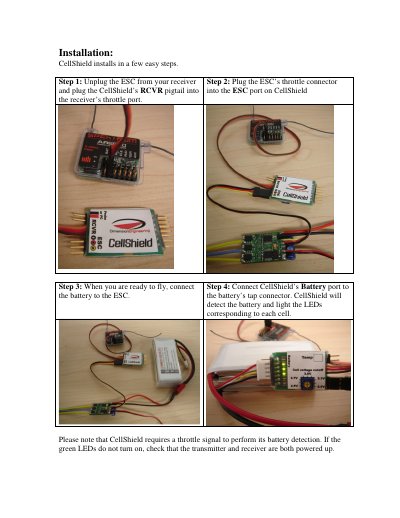
This guide provides step-by-step instructions for installing the CellShield battery protection module on a receiver and ESC. It details the wiring connections required to enable battery detection via the throttle signal.
The document also covers how to adjust the cutoff voltage using the onboard potentiometer and explains the functionality of the optional thermal probes, including temperature thresholds and throttle reduction behaviors.
| Cutoff Voltage Range | 2.5v to 3.5v per cell |
|---|---|
| Default Cutoff Voltage | 3.0v/cell |
| Overheat Threshold | 150 degrees Fahrenheit |
The default cutoff voltage is set to 3.0v per cell.
Use a small Phillips screwdriver to turn the blue potentiometer dial.