
Daikin DCS301B61 Unified ON/OFF Controller Operation and Installation Manual


Daikin DCS301B61 Unified ON/OFF Controller Operation and Installation Manual - cover page
Brand
DCS301B61
Document type
User Manual
Language
English
Pages
4
File format
PDF
File size
232 KB
Published
03 August, 2012
Updated
03 August, 2012
MD5 checksum
650BA8A5F348E5F42930A431AFB214BF

About this manual

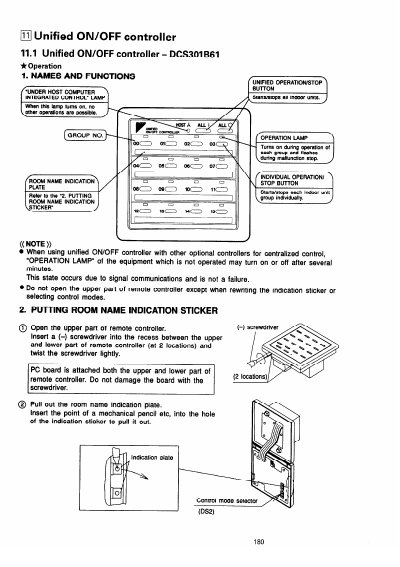
The Daikin DCS301B61 is an optional accessory designed to enable unified operation/stop control for a maximum of 16 groups of indoor units. It allows users to start or stop all connected indoor units simultaneously via a single button, while also supporting individual unit control and centralized scheduling.

What's inside

  • Names and Functions
  • Putting Room Name Indication Sticker
  • Selecting Control Modes
  • Display of Malfunction
  • Installation Components
  • System Configuration
  • Setting Group No. for Centralized Control
  • Confirming Operation

Specifications

Maximum groups per controller16 groups
Total capacity with multiple controllers128 groups

Frequently asked questions

What happens if the operation lamp flashes?

Flashing of the operation lamp indicates malfunctions in the indoor unit within the group where the lamp is flashing.

What happens to the operation lamp when using this controller with other optional controllers?

The operation lamp of equipment that is not operated may turn on or off after several minutes due to signal communications, which is not a failure.

How long must you hold the button down to enter FIELD SET MODE?

You need to hold down the button for a minimum of 4 seconds while in normal mode.

How many groups of indoor units can one unified ON/OFF controller manage?

One controller enables individual and unified operation/stop for a maximum of 16 groups.

Download PDF (232 KB)