
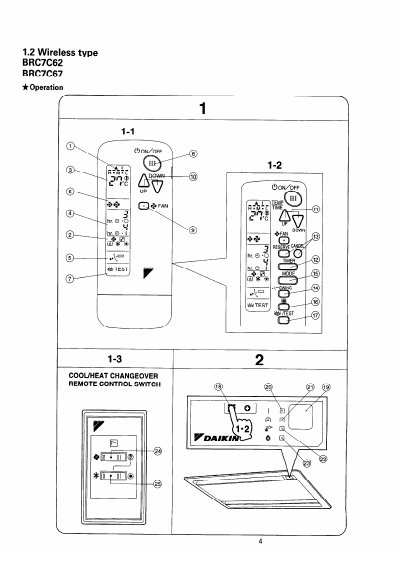
This manual provides operating instructions for the Daikin BRC7C62 and BRC7C67 wireless remote controllers. It details how to select operation modes such as cooling, heating, automatic, and fan-only, as well as how to adjust air flow direction and fan speed. The document explains the functions of various buttons and indicator lamps on the controller.
| Maximum Timer Duration | 72 hours |
|---|---|
| Power On Preparation | 6 hours before operation |
| Defrost Duration | 6 to 8 minutes |
Press the OPERATION MODE SELECTOR button several times and select the desired mode, such as COOLING, HEATING, AUTOMATIC, or FAN.
The OPERATION lamp lights up when the system starts operation and goes off when the system stops.
Press the AIR FLOW DIRECTION ADJUST button to select the air direction of your choice or to set the automatic swing.
Clean the air filter as explained in the indoor unit's operation manual and then press the FILTER SIGN RESET BUTTON.