
This document is the Sentinel Quick Start Guide, which provides the basic information required to use the Sentinel. It recommends using Chrome browser and installing Java Runtime Environment v1.5.x or later. For connections, a 24VDC adapter and an Ethernet cable are required. Audio connections can be made using unbalanced AES digital connections or balanced AES digital connections. Detailed information can be found in the User Manual and online help.
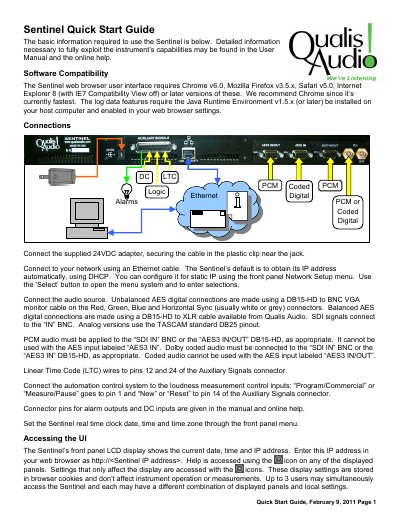
This guide provides basic information for using the Sentinel loudness measurement instrument. It details software compatibility requirements, including specific versions of web browsers and the Java Runtime Environment. The document explains how to connect the device to a network and audio sources using various cables and connectors.
| Data Storage Capacity | 27 hours |
|---|---|
| Power Supply | 24VDC adapter |
The Sentinel requires Chrome v6.0, Mozilla Firefox v3.5.x, Safari v5.0, or Internet Explorer 8 with IE7 Compatibility View off.
The device is set to obtain its IP address automatically using DHCP.
The instrument maintains 27 hours of data in its internal memory.