
This document describes how to set up the solar system. It includes setting system time, setting water temperature, setting solar freeze protection, setting cleaner freeze protection and setting air sensor.
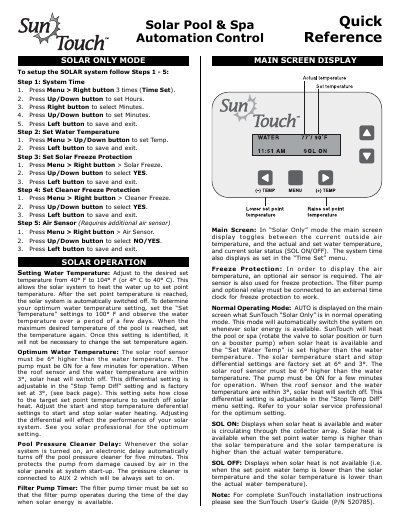
This document serves as a quick reference guide for the SunTouch solar pool automation control system. It provides step-by-step instructions for initial setup, specifically focusing on configuring the system time, water temperature limits, and freeze protection features for both the solar equipment and pool cleaners.
The guide details how to navigate the main screen display to monitor actual and set temperatures, as well as solar status (SOL ON/OFF). It explains the normal operating mode logic where the system automatically heats the pool when solar energy is available and the set point temperature is higher than the current water temperature. Additionally, it covers menu settings for adjusting start/stop temperature differentials and configuring pump types.
| Temperature Range (F) | 40° F to 104° F |
|---|---|
| Temperature Range (C) | 4° C to 40° C |
| Solar Start Differential | 6° higher than water temperature |
| Solar Stop Differential (Factory) | 3° |
| Freeze Protection Trigger Temp | 36° F (2° C) |
If enabled, the circuit switches on when the air temperature drops to 36° F (2° C) to protect plumbing and equipment.
SOL ON displays when solar heat is available and water is circulating through the collector array.