
This document is a quick reference setup instructions for 3M MP8660 projector. The projector has brightness, contrast, color, tint, brightness, contrast, position, phase, H size, MAC mode, and more setting options. It can connect to computer, TV, etc.
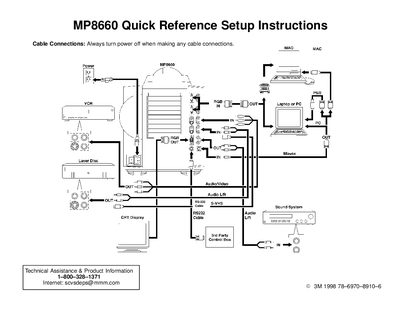
This document provides quick reference setup instructions for the 3M MP8660 projector. It details how to connect cables such as VGA, S-VHS, and audio/video inputs, emphasizing that power must be off during connection. The guide also explains the sequence for powering on the device: turn on the projector first, then the input sources.
Turn on the projector power first, then turn on the power to the input sources.
Press the ZOOM +/- button on the control panel or remote to increase or decrease the size of the screen image.