
This document is the user manual for the UDW10055 video surveillance system, providing detailed information about the accessories included in the product packaging and important safety instructions. The video surveillance system includes a portable receiver with a 3.5-inch color LCD display, two UWDC25 wireless weatherproof cameras, two antennas, two camera stands, one AC adapter for the receiver, two AC adapters for the cameras, a software CD, AV cables, USB cable, and two extension cords. Users are advised to follow basic safety precautions to reduce the risk of fire, electric shock, and injury when using the equipment.
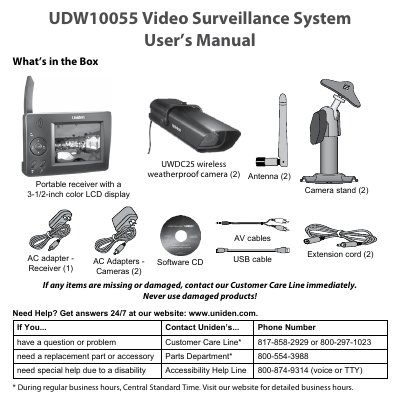
The Uniden UDW10055 Video Surveillance System consists of a portable receiver with a 3-1/2-inch color LCD display and two UWDC25 wireless weatherproof cameras. The system is designed for home security monitoring and includes features such as quad display, zoom mode, and night vision. It operates on a 120-volt AC power supply and includes accessories like antennas, camera stands, and software cables.
| Receiver Display | 3-1/2-inch color LCD |
|---|---|
| Camera Model | UWDC25 |
| Power Input | 120 volt AC |
| Included Cameras | 2 |
The icons indicate signal strength: 1-low, 2-fair, 3-good, or 4-strong.
Press and hold the POWER button to turn the receiver off.
A flashing battery status light indicates the receiver is in pairing mode.