
Uniden UDW-10003 Video Surveillance System User's Manual

Introduces the features and usage of UDW-10003 video surveillance system.
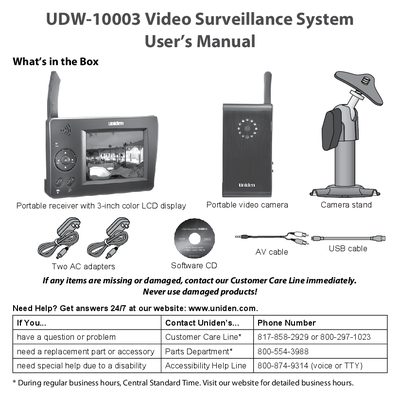

Uniden UDW-10003 Video Surveillance System User's Manual - cover page
Brand
UDW-10003
Category
Video Game Consoles
Document type
User Manual
Language
English
Pages
24
File format
PDF
File size
2.3 MB
Published
05 July, 2012
Updated
30 September, 2023
MD5 checksum
C929953A4832EBF563779BC729BDC505

About this manual

This manual provides instructions for the Uniden UDW-10003 Video Surveillance System, a portable video camera and receiver set. It details the contents of the box, safety instructions, and initial setup steps including connecting power and charging batteries. The guide explains how to operate the camera and receiver buttons, understand status lights, and use the camera mount.

What's inside

  • Important Safety Instructions
  • Getting Started
  • Connect the Power
  • Charge the batteries
  • Check the Video Signal
  • Learning Your System
  • Get to Know the Camera
  • Using the camera mount
  • Get to Know the Receiver
  • Using the Menu

Frequently asked questions

How long does it take for the batteries in the camera and receiver to charge fully?

The batteries will charge completely in about 8 hours when power is connected.

What happens if the battery status light on the camera turns red?

A red light indicates that the battery is low and the camera will turn off in 3 minutes.

What should you do if the power status light on the camera does not come on?

You should try reconnecting the AC adapter or checking if the wall outlet is controlled by a switch.

Download PDF (2.3 MB)