
Uniden D3580 Series Cordless Phone User's Guide

This manual introduces the functions and usage of Uniden D3580 series telephones
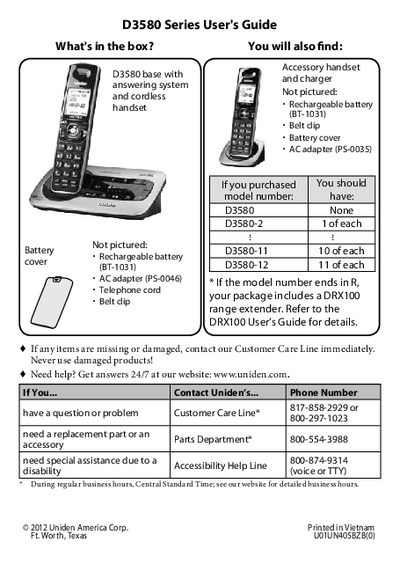

Uniden D3580 Series Cordless Phone User's Guide - cover page
Brand
D3580
Category
Other Electronics
Document type
User Manual
Language
English
Pages
28
File format
PDF
File size
1 MB
Published
05 July, 2012
Updated
30 September, 2023
MD5 checksum
5420F90CD346DBBC00A6CD126EB4C2BF

About this manual

This manual provides instructions for setting up and using the Uniden D3580 Series cordless phone system. It details how to install the base and handsets, charge the batteries, and configure the device for standard telephone use, including pulse and tone dialing modes.

What's inside

  • Getting Started
  • Installing Your Phone
  • Setting Up the CellLink Bluetooth Connection
  • Getting to Know Your Phone
  • Using Your Bluetooth Connection
  • Using the Answering System
  • Important Safety Instructions
  • Solving Problems

Specifications

Bluetooth VersionBluetooth V2.1
Bluetooth Rangeabout 33 feet (10 m)
Battery Charge Timeabout 15 hours

Frequently asked questions

What is the default dialing mode?

The phone uses tone dialing by default.

What is the PIN code to pair a Bluetooth phone?

The PIN code is 0000 (four zeroes).

How many Bluetooth phones can be paired?

The D3580 can save pairing information for four different Bluetooth phones.

Download PDF (1 MB)