
This document is the standard wiring diagram for inserting wires into the 85-366 CAT 6 RJ-45 modular plug. It describes how to insert the wires into the modular plug and provides information on what to watch out for when inserting the wires.
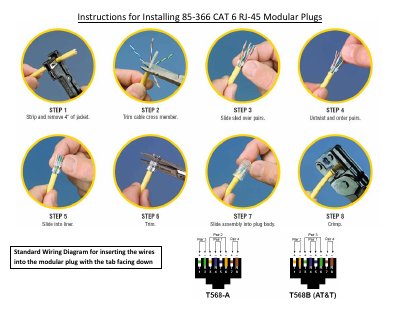
This document provides step-by-step instructions for installing the 85-366 CAT 6 RJ-45 modular plug. The process involves stripping the cable jacket, trimming the cross member, sliding the sled over the pairs, untwisting and ordering the wire pairs, and finally crimping the assembly into the plug body.
The guide includes a standard wiring diagram for inserting the wires into the modular plug with the tab facing down, specifically for the T568B (AT&T) configuration.
You must strip and remove 4 inches of the jacket.
The standard wiring diagram is T568B (AT&T).