
This chapter describes how to record an Ensemble song.
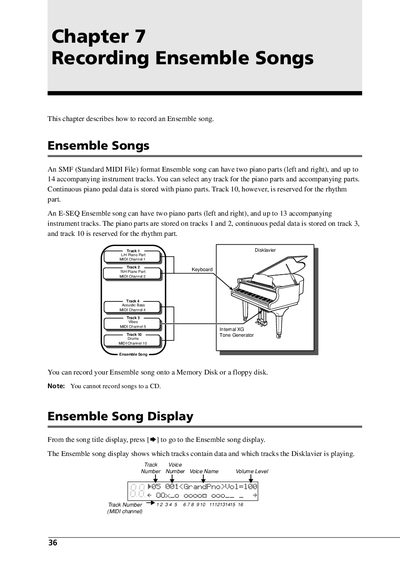
This document details the process of recording Ensemble songs, which can consist of up to 16 individually recorded tracks including two piano parts and accompanying instruments. Users can record these songs onto a Memory Disk or floppy disk, though recording to a CD is not supported. The guide explains how to select tracks, assign voices, and adjust volume levels for each part.
| Max Piano Parts | Two (left and right) |
|---|---|
| Max Accompanying Tracks (SMF) | 14 |
| Max Accompanying Tracks (E-SEQ) | 13 |
| Total Tracks | 16 |
| Volume Range | 0 to 127 |
| Voice Range | 1 to 128 |
| Quantize Values | off, 1/4, 1/6, 1/8, 1/12, 1/16 |
No, you cannot record songs to a CD.
An SMF format song can have up to 16 tracks, while an E-SEQ song can have up to 15 tracks (including rhythm).
Quantize is a permanent operation, and a quantized track cannot be played back unquantized.
Yes, extra parts can be overdubbed onto a recorded track, which is useful for creating rhythm tracks.