
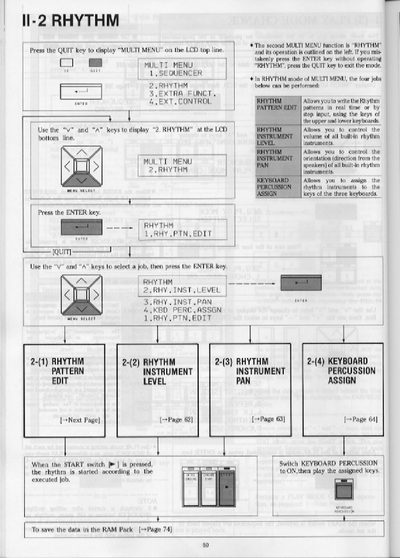
The Yamaha II-2 is a rhythm keyboard that allows users to create and edit rhythm patterns in real-time or via step input. The device features multiple keyboards and percussion sections with assignable instruments.
Users can perform various tasks within the Rhythm mode, including editing pattern variations and fill-in patterns, adjusting instrument volume levels, controlling stereo panning orientation, and assigning specific instruments to keys across the three keyboards.
| Number of User Buttons | Four |
|---|---|
| Rhythm Patterns per User Button | Two Rhythm patterns and two Fill In Patterns |
| Beat Range | 1/4 to 5/4 |
Press the QUIT key to exit the mode if you mistakenly press ENTER without operating RHYTHM.
The device allows you to edit and memorize two Rhythm patterns and two Fill In Patterns per USER button.