
This document introduces how to play photos and audio snapshots on the EX-M20U digital camera
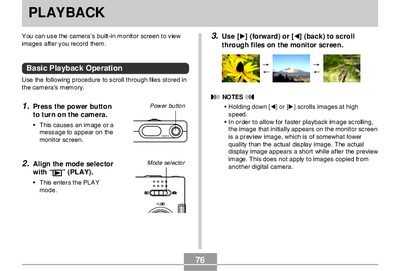
This manual covers playback operations for the Panasonic Lumix EX-M20U digital camera. Users can view recorded images using the built-in monitor screen by setting the mode selector to 'PLAY'. The guide details how to scroll through files, adjust audio volume for snapshots, and flip or zoom the display image.
| SXGA Resolution | 1280 x 960 pixels |
|---|---|
| VGA Resolution | 640 x 480 pixels |
No, audio volume can only be adjusted when playback is being performed or is paused.
No, you cannot play an audio snapshot on the monitor screen while a flipped image is displayed.
No, an image recorded using another camera model cannot be cropped.