
This document introduces the connection method of computer components.
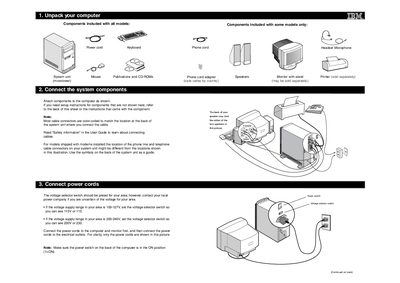
The guide provides step‑by‑step instructions for unpacking an IBM computer, locating the included components, and attaching them correctly. It explains the color‑coded cable connections and safety information needed before powering the system.
After the hardware is connected, the guide covers setting the voltage selector switch, turning on the power, and completing the initial software setup, including reading license agreements and installing programs from the Software Selections CD.
| Voltage selector switch setting (100‑127 V) | 115 V |
|---|---|
| Voltage selector switch setting (200‑240 V) | 230 V |
| Power switch position | ON |
If your supply is 100‑127 V, set the switch to show 115 V; if it is 200‑240 V, set it to show 230 V.
Turn on the monitor and computer, read the license agreements, insert the Software Selections CD, and follow the on‑screen installation prompts.