
This document introduces the installation method of Model 390 telephone, including desktop installation and wall mounting.
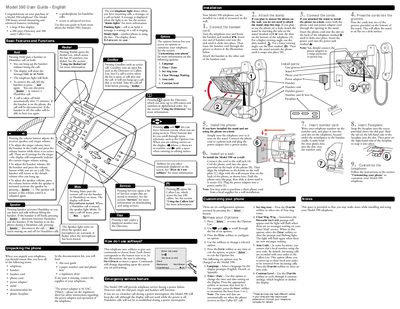
This guide introduces the Model 390 telephone, highlighting its large 8‑line display, 200‑entry Directory, 100‑entry Callers List, speakerphone, and various customizable options. It also covers basic call handling functions such as hold, mute, redial, and volume adjustments.
Installation instructions show how to unpack the phone, connect the handset and power adaptor (16 VAC / 250 mA), mount the unit on a desk or wall, and attach the stand. The guide details customization of language, time/date, ring tone, area codes, contrast, and other options, as well as using the Directory and Callers List for contact management.
| Display lines | 8 |
|---|---|
| Directory capacity | 200 entries |
| Callers List capacity | 100 entries |
| Power adaptor rating | 16 VAC, 250 mA |
| Speakerphone | Hands‑free calls supported |
| Ringer volume settings | 8 levels |
| Contrast levels | 8 settings |
The Callers List records the last 100 callers.
During a power failure the dial pad, ringer and handset continue to work, but the display is off.
Press the volume button while no call is active; there are eight ringer‑volume settings.