
This unit can record to DVD+RW, DVD+R, DVD-RW and DVD-R. DVD+R/DVD-R can only be recorded to once. DVD+RW/DVD-RW can be recorded to and erased many times.•Following discs are recommended for good recording quality and are proven to be compatible with this unit. However, depending on the media condition the unit may not read the disc properly. Verbatim DVD+R 8x, DVD+RW 4x, DVD-R 8x, DVD-RW 2x, JVC DVD-RW 4x, Maxell DVD+R 4x/8x/16x, DVD-R 8x/16x, SONY DVD+R 4x/8x/16x, DVD+RW 4x, TDK DVD+R 4x/8x/16x Performance of any other discs are not guaranteed.•You can play back DVD+RW on most DVD players without finalizing. However, if you have added or deleted chapters, or made chapters hidden, you must perform “Make Edits Compatible” before being able to see those effects on other units (see page 83 in the user manual). To play back discs other than DVD+RW on other DVD players, you will need to finalize.•DVD-RW recorded in the mode other than +VR is not recordable on this unit unless you erase all contents in the disc (see page 82 in the user manual).•DVD-R recorded in the mode other than +VR is not recordable on this unit. 1 Connections Follow to the back side of this sheet. This unit is compatible to play back the following discs / files. is a trademark of DVD Format/Logo Licensing Corporation. Logo Attributes DVD+RW DVD+R DVD-RW DVD-R 8cm/12cm, single-sided, single layer disc Approx. max. recording time (SLP mode): 360 minutes (4.7GB) (for 12cm) 108 minutes (1.4GB) (for 8cm) T
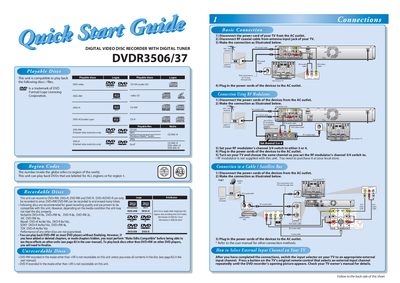
The DVDR3506/37 is a digital video disc recorder with a digital tuner that can play back DVDs from all regions or region 1, and record to DVD+RW, DVD+R, DVD-RW, and DVD-R. It supports a variety of disc formats and provides recommended media for optimal recording quality.
The guide explains how to connect the unit to a TV using RF, coaxial, or RCA cables, how to perform the initial language and channel setup, and how to use the remote control for basic and timer recordings, playback, and channel selection.
| Supported disc formats | DVD+RW, DVD+R, DVD-RW, DVD-R |
|---|---|
| Region compatibility | All regions or region 1 |
| Recording speeds | DVD+R 8x, DVD+RW 4x, DVD-R 8x, DVD-RW 2x |
| Maximum timer programs | 12 programs per month |
Press the [a / ¥] button to select your desired language, then press [OK] to set it.
You can schedule up to 12 programs within a month, with daily or weekly options available.
Yes, you must finalize DVD+R, DVD-RW, or DVD-R discs before they can be played on other players.