
This document is a Toshiba Satellite laptop LCD screen removal guide, which introduces how to remove and replace the laptop LCD screen.
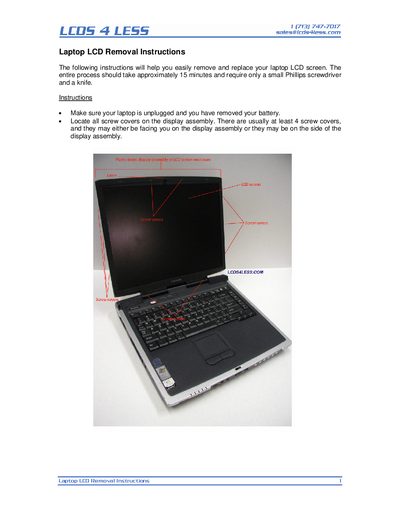
These instructions show how to disconnect a laptop LCD screen in about 15 minutes. First, unplug the laptop and remove the battery, then locate and remove the screw covers on the display assembly. Use a small Phillips screwdriver to take out the screws beneath the covers and unsnap the front bezel.
The guide also explains how to identify the LCD screen manufacturer’s label and part number, listing common manufacturers such as Acer, AU Optronics, Samsung, and Toshiba. It advises ordering replacement screens by the manufacturer’s part number for accuracy.
A small Phillips screwdriver and a knife (or an X‑Acto blade) are sufficient.