
This document provides installation preparation and instructions for the SWI-JACK Universal Steering Wheel Control Interface. The document includes an application guide for different vehicles and connection information. It also provides detailed instructions on how to connect the SWI-JACK to different brands of radios, such as Alpine, JVC, Clarion, and Kenwood, to enable steering wheel control functionality.
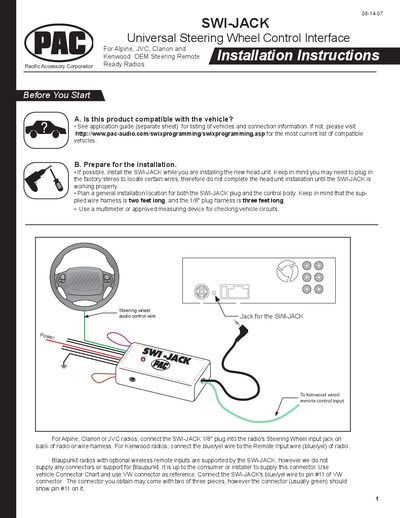
The SWI-JACK is a universal steering‑wheel control interface for Alpine, JVC, Clarion, Kenwood and other radios. The manual explains how to verify vehicle compatibility, prepare the installation location, and connect the supplied wire harness (2 ft) and 1/8" plug harness (3 ft).\n\nDetailed sections cover wiring connections, programming the interface to match the vehicle and radio, testing the functions, and troubleshooting common issues such as power problems or incorrect button behavior.
| Wire harness length | 2 ft |
|---|---|
| Plug harness length | 3 ft |
Consult the application guide (separate sheet) or visit the PAC website for the most current list of compatible vehicles.
Check the red wire connection and fuse, and make sure the interface is connected to switched +12 V, not constant +12 V, with the ignition on.
Press and release the programming/mode button the same number of times as the desired version number; the LED will flash to confirm.
During programming, press the steering‑wheel button firmly until the left LED turns off; releasing too early causes the interface to send a signal continuously.