
This manual describes how to use the TV Pillow Remote. This remote can be used to control up to six devices.
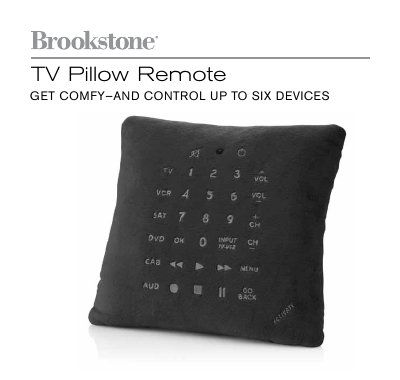
This manual provides safety warnings, a description of the remote’s layout, and step‑by‑step instructions for inserting two AAA batteries and turning the unit on. It also details the three programming modes—Manual Search, Quick Search, and Auto Search—so users can assign the correct four‑digit codes for TV, VCR, DVD, satellite, cable, or audio devices.
Additional sections cover code‑reading mode, menu navigation, routine care, maintenance, and warranty information. FCC compliance notes and troubleshooting tips are included to help avoid interference and ensure reliable operation.
| Physical size | 5"W x 4.75"H |
|---|---|
| Battery type | 2 AAA batteries |
| Maximum devices controllable | Up to six devices |
| Power switch location | On/Off switch on the battery compartment |
It can control up to six devices such as TV, VCR, DVD, satellite, cable or audio equipment.
The remote uses two AAA batteries; open the battery compartment, insert the batteries following the polarity markings, slide the cover closed and turn the On/Off switch to on.
Try reorienting the receiving antenna, increase the distance between the remote and the receiver, or connect the remote to a different circuit.