
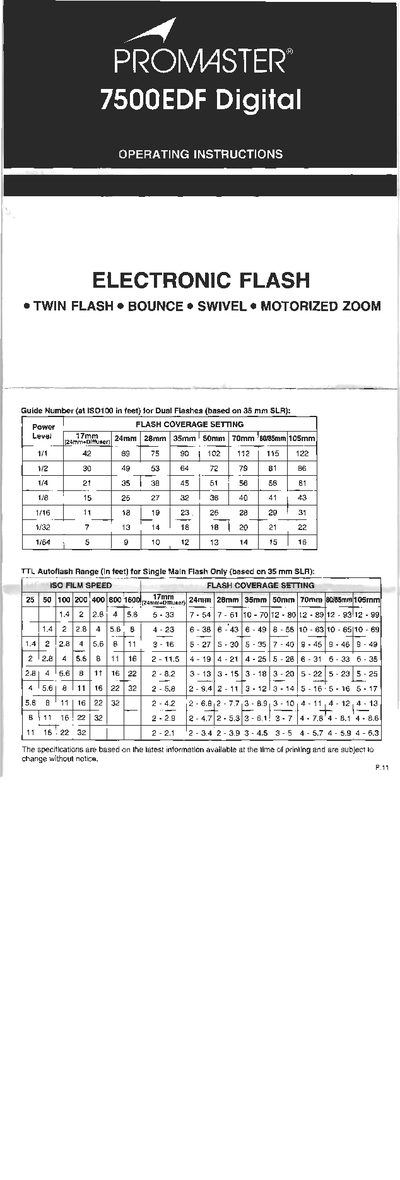
This manual explains how to set up and operate the Promaster 7500EDF digital flash unit. It covers parts identification, battery insertion, LCD panel functions, and the five flash modes (TTL, M, MULTI, MODEL, SLAVE). Detailed instructions are given for each mode, including how to select flash power, frequency, and modeling flash settings.
Additional sections describe automatic power‑off, bounce photography, dual‑flash operation, rear‑curtain synchronization, and zoom functions (auto and manual). The specifications at the end list power source options, flash duration, zoom range, coverage angles, guide numbers, and other performance data.
| Power Source | 4 × 1.5 V AA Alkaline or Promaster NiMH AA rechargeable batteries |
|---|---|
| Recycling Time | 0.3‑1.0 s |
| Flash Duration | 1/30,000 – 1/1,000 s |
| Bounce Angle Range | -7° to 90° (clip stops at -7°, 0°, 45°, 60°, 75°, 90°) |
| Swivel Angle Range | 0° to 180° (clip stops at 0°, 30°, 60°, 90°, 120°, 150°, 180°) |
| Power Zoom Focal Lengths | 24 mm – 105 mm (motorized) |
Open the battery compartment cover, insert four AA batteries following the polarity markings, and replace the cover.
The flash offers five modes: TTL, M (manual), MULTI, MODEL, and SLAVE, selectable with the MODE button.
Rotate the flash head to a bounce or swivel position; the LCD will show a bounce indicator and the flash range display will disappear, allowing soft illumination from reflected surfaces.