
The F510 watch is known for its high time accuracy, with an average monthly difference of ±20 seconds. It features a 24-hour display for time, hours, minutes, and seconds, as well as a calendar display. Additionally, the watch has a stopwatch function with a maximum measurement time of 60 minutes.
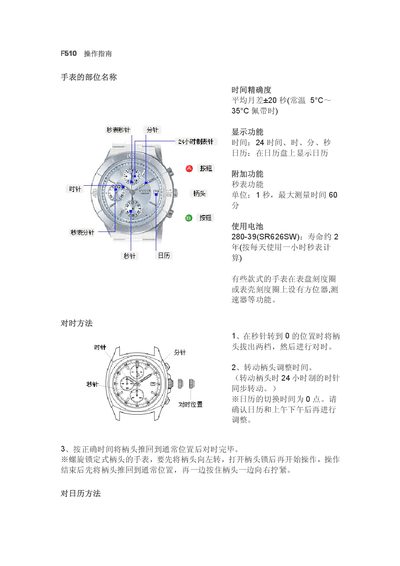
This manual provides step‑by‑step instructions for operating the F510 watch. It covers the parts of the watch, how to set the time, adjust the calendar, and use the built‑in stopwatch.
Additional sections describe the watch’s display functions, battery type and lifespan, and special precautions such as avoiding calendar adjustments between 9 PM and 1 AM. This manual is written in Chinese.
| Time accuracy | Average monthly deviation +20 seconds |
|---|---|
| Battery type | SR626SW (280‑39) |
| Battery life | Approximately 2 years (1 hour per day use) |
| Stopwatch unit | 1 second, maximum 59 min 59 s |
Pull the crown out to the time‑setting position, turn it clockwise to adjust the time, then push the crown back to the normal position.
Pull the crown to the time‑setting position, press the start button to move the seconds hand to zero, then push the crown back and confirm the adjustment.