
This is the operating manual for 677 watch. It contains the basic operating methods of the watch, including the setting methods of time, date, alarm clock, stopwatch, etc.
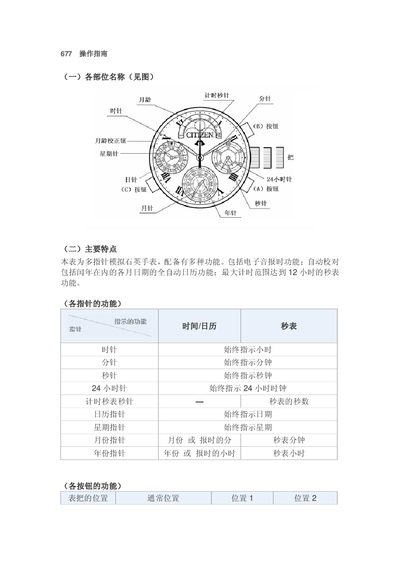
The 677 watch manual provides detailed instructions on each component of the watch, including the functions of the hour, minute, second, 24‑hour, calendar, weekday, month, and year hands. It also describes the operation of the three buttons (A, B, C) for setting time, date, alarm, and switching to the stopwatch mode.
Step‑by‑step procedures cover confirming and adjusting the baseline positions after battery replacement or impact, setting the time, weekday, alarm, calendar, month‑age, and using the stopwatch with its 12‑hour maximum timing range. The manual includes notes on beep alerts, alarm tones, and troubleshooting tips. This manual is written in Chinese.
| Movement type | Quartz |
|---|---|
| Stopwatch maximum timing range | 12 hours |
| Alarm type | Electronic sound |
| Automatic calendar | Full‑automatic date calendar including leap years |
Pull the crown to position 2, press buttons A, B and C simultaneously, then release; the hands will move briefly and a beep will confirm the system reset.