
This document describes the features and functions of a pointer quartz watch, including indications for hours, minutes, seconds, 24 hours, and calendar. It also has automatic adjustment of dates and a calendar lookup function.
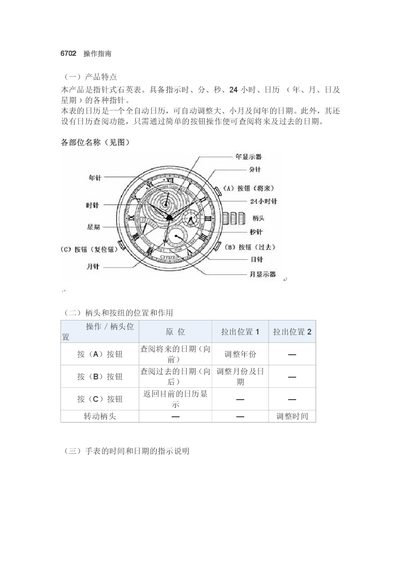
This manual describes the features of the 6702 analog quartz watch, including hour, minute, second, 24‑hour, calendar (year, month, day) and weekday indicators, as well as a fully automatic calendar that adjusts for month length and leap years.
It provides step‑by‑step instructions for confirming and adjusting the baseline (zero) position, setting the time and calendar, and viewing past or future dates, with warnings about proper crown handling to avoid reduced battery life. This manual is written in Chinese.
| Calendar cycle | 28 years |
|---|---|
| Date range | 1900‑03‑01 to 2100‑02‑28 |
Press and hold button (C) for about 2 seconds while the crown is in the original position; the year, month, day, and weekday hands will move to the baseline (2000‑12‑31, Sunday).
No, setting the calendar during that period may cause the next day's date to change incorrectly.
When the crown is returned, the watch automatically changes the date to the first day of the next month (e.g., March 1).