
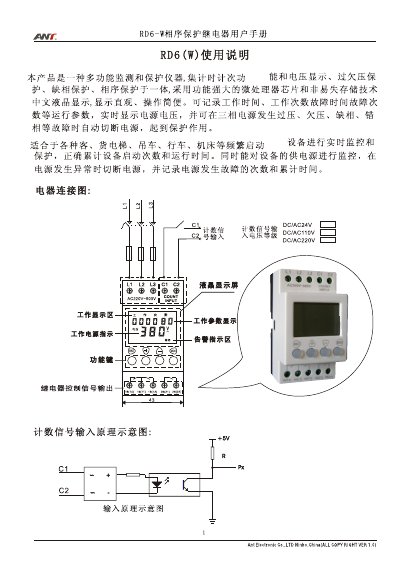
The RD6‑W is a multifunction monitoring and protection relay with a built‑in microprocessor, non‑volatile storage and a Chinese LCD display. It records operating time, start‑up counts and fault events, and automatically disconnects power when over‑voltage, under‑voltage, missing‑phase or phase‑sequence errors occur.
The manual describes the main functions, technical specifications, operation procedures (display navigation, setting over/under‑voltage values, alarm handling), internal parameter modification for technicians, and warranty information. This manual is written in Chinese.
| Maximum counting capacity | 99,999 counts |
|---|---|
| Maximum timing capacity | 9,999 hours 59 minutes |
| Maximum counting frequency | 5 Hz |
| Power supply voltage | Three‑phase 220 V~450 VAC |
| Voltage display range | 150 V~500 V |
| Voltage measurement accuracy | ±0.001 % |
| Counting input signal | AC or DC, 2 A/250 VAC |
| Operating temperature range | -5 °C~45 °C |
Long‑press the “四” key to enter the setting mode, then use the “四” or “名” key to adjust the values and confirm with the “作” key.
Select the function code FE 9 1 and press the appropriate key to reset the timing/counting values to zero.
The LCD shows an alarm (e.g., “过压”, “缺相”) and the relay contacts open, recording the fault count and cumulative fault time.
No, internal parameter modification is restricted to professional technicians and requires a password entered by pressing specific keys.