
XD-PTH is a high-precision digital pressure sensor. It has the advantages of high accuracy and long-term stability. The sensor can measure pressure in the range of 0-100% (relative pressure). The pressure measurement error is less than or equal to 1%. The sensor can be used in a variety of applications, such as industrial automation, medical equipment, and automotive applications.
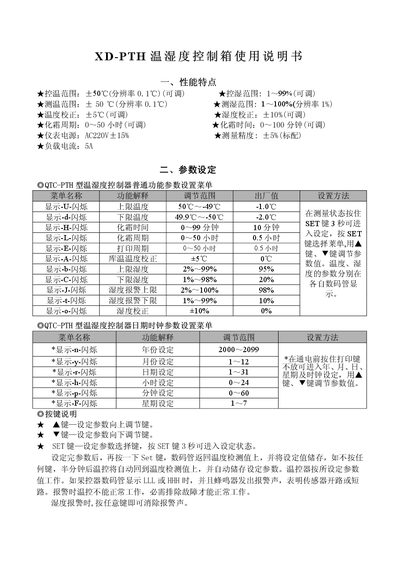
This manual describes the performance features of the XD-PTH temperature and humidity control box, including adjustable temperature range, humidity range, calibration settings, and defrost cycles. It also outlines the power requirements, measurement accuracy, and load current specifications.
Detailed instructions cover parameter setting via the SET key, key functions, operation examples, wiring diagrams, and installation precautions. Safety notes advise proper placement, wiring separation, and professional configuration to ensure reliable operation. This manual is written in Chinese.
| Temperature range | -50 °C to 50 °C |
|---|---|
| Temperature resolution | 0.1 °C |
| Humidity range | 1 % to 99 % |
| Humidity resolution | 0.1 % |
| Temperature calibration | ±5 °C (adjustable) |
| Humidity calibration | ±10 % (adjustable) |
| Defrost cycle | 0 to 50 hours (adjustable) |
| Power supply | AC 220 V ±15 % |
| Measurement accuracy | ±5 % (standard) |
| Load current | 5 A |
| Overall dimensions | 173 mm (W) × 113 mm (H) × 60 mm (D) |
Press the SET key for 3 seconds to enter setting mode, then use the up/down keys to adjust values and press SET again to store them.
It means the sensor is open‑circuit or short‑circuit, and the controller cannot operate until the fault is cleared.
Press any key to silence the alarm.
Press and hold the defrost key for 3 seconds to start a forced defrost.