
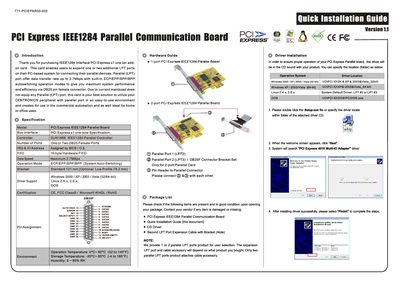
This manual explains how to install the PCI Express IEEE1284 Parallel Communication Board, which adds one or two DB25 female LPT ports to a PC via a PCI Express x1 slot. The board supports ECP/EPP/SPP/BPP auto‑switching modes with a maximum data rate of 2.7 MBps and includes optional low‑profile brackets.
The document covers driver installation for Windows and Linux, hardware verification steps, LPT port configuration, and detailed troubleshooting procedures, including how to uninstall the driver package.
| Bus Interface | PCI Express x1 |
|---|---|
| Controller | SUN1888 IEEE1284 Parallel Controller |
| Number of Ports | One or Two DB25 Female Ports |
| IRQ & Address | Assigned by BIOS |
| Hardware FIFO | 16 byte |
| Maximum Data Speed | 2.7 MBps |
| Operation Modes | ECP/EPP/SPP/BPP (Auto‑Switching) |
| Bracket Standard | 121 mm (Optional Low Profile 79.2 mm) |
| Supported OS (Windows) | 2000 / XP / 2003 / Vista (32/64‑bit) |
| Supported OS (Linux) | 2.4.x, 2.6.x |
| Certifications | CE, FCC Class B, Microsoft WHQL, RoHS |
| Operating Temperature | 0 °C ~ 60 °C |
| Storage Temperature | -20 °C ~ 85 °C |
| Humidity | 5 % ~ 95 % RH |
Insert the driver CD, run Setup.exe, follow the wizard by clicking Next, and finish the installation; the driver files are located under the appropriate OS folder on the CD.
No, under Windows 2000, XP, 2003, Vista, or Linux you cannot remap the LPT port to the legacy 278h or 378h ISA address.
Open Add/Remove Programs in Control Panel, select the Golden Adapter Driver and Port Driver, and remove them one by one; then reboot the system.