
MMA meter operation manual, which introduces the meter's operation panel, button instructions, meter parameter setting, relay setting and other contents.
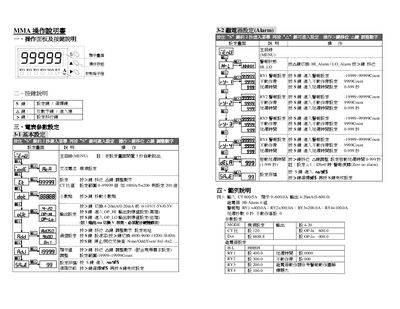
This manual describes the operation panel and button functions, including how to navigate the main menu and adjust settings. It provides step‑by‑step instructions for basic and advanced parameter configuration, such as CT ratio, scaling, and decimal point adjustments.
Additional sections cover communication settings (MODBUS‑RTU), handling residual display values, troubleshooting display errors, and detailed alarm behavior with dead‑band and delay time configurations. This manual is written in Chinese.
| CT Ratio Setting Range | 0~99999 |
|---|---|
| Count Setting Range | -19999~19999 |
| Output Signal Options | 4‑20 mA / 0‑20 mA / 0‑10 V / 1‑5 V / 0‑5 V |
| Communication Protocol | MODBUS‑RTU |
| Baud Rate Options | 4800, 9600, 19200, 38400 |
Press and hold the “$” key for 2 seconds to enter the basic setting menu.
The device communicates using the MODBUS‑RTU protocol.
Use the “>” key to move the decimal point left or right.
It indicates an abnormal condition such as missing wiring, signal error, or signal disconnection.