
This document is a MMV operation manual, which mainly introduces the MMV's operation panel, button description, electric meter parameter setting, relay setting and so on.
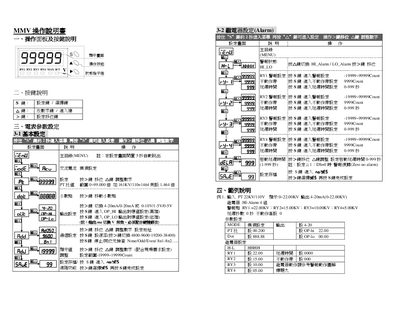
This manual provides step‑by‑step instructions for operating the MMYV meter, including detailed descriptions of the front‑panel keys, how to adjust numeric values, and how to configure basic and relay alarm settings. It also covers advanced functions such as residual‑value masking and sampling rate selection.
The document includes Modbus‑RTU communication parameters, data format specifications, and troubleshooting guidance for display errors and alarm actions. Sample configuration examples illustrate typical PT ratio and alarm point setups. This manual is written in Chinese.
| Output signal options | 4‑20 mA / 0‑20 mA or 0‑10 V / 1‑5 V / 0‑5 Y |
|---|---|
| PT ratio setting example | 1.464 × for 161 kV/110 V |
| Baud rate options | 4800, 9600, 19200, 38400 |
| Communication protocol | Modbus‑RTU |
| Alarm delay time range | 0 ~ 999 seconds |
Enter the PT setting menu, press the > key to move the cursor, and input the desired ratio such as 1.464 × for a 161 kV/110 V input.
Select the alarm setting (RY1‑RY4) with the S key, then use the > key to adjust the numeric value for each alarm point, e.g., RY1 = 22.00 kV, RY2 = 15.00 kV, etc.
Use the SAVE‑99 function: press the appropriate key, enter 27, and the residual value will be masked from the display.