
845GVME-S P/N: 91-185-U45-F1-0E Motherboard Layout Easy Installation Guide
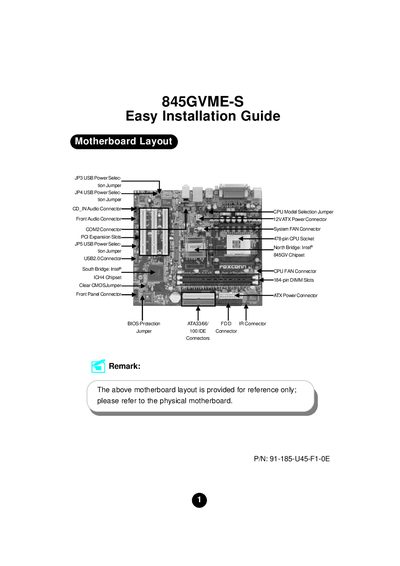
This guide covers the physical layout of the 845GVME-S motherboard, including rear panel connectors, front panel jumpers, and internal headers. It lists the accessory checklist, explains each connector (USB, VGA, LAN, audio, IrDA, COM2) and details the jumper configurations for CMOS clearing, BIOS protection, CPU selection, and USB power selection.
The document also outlines supported CPUs and memory types, describes the Realtek ALC655 6‑channel audio implementation, and provides step‑by‑step instructions for powering on the board, loading optimized defaults, and installing drivers from the included Foxconn Utility CD.
| CPU Socket | 478‑pin |
|---|---|
| North Bridge Chipset | Intel® 845GV |
| South Bridge Chipset | Intel® ICH4 |
| DIMM Slots | Two 184‑pin slots |
| Supported CPUs | Intel® Pentium® 4 and Celeron® socket 478 (Willamette/Northwood/Prescott) |
| Front Side Bus | 400 MHz / 533 MHz |
| Maximum CPU Speed | Up to 2.8 GHz (Prescott) / 3.06 GHz (Northwood) |
| Audio Chip | Realtek ALC655 (6‑channel) |
| Rear Panel USB Ports | Four USB 2.0 ports |
It supports Intel® Pentium® 4 and Intel® Celeron® processors in socket 478, including Willamette, Northwood, and Prescott cores.
The CD contains drivers for the chipset, IAA, DirectX 9.0, VGA, USB 2.0, audio, and LAN.
Four USB 2.0 ports are provided on the rear panel.