
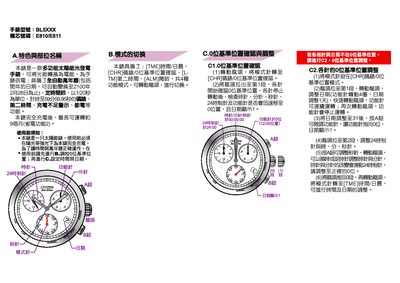
This manual provides instructions for using the BL5XXX solar‑powered watch. It covers pre‑use charging, zero‑position calibration, and how to operate the four function modes, including automatic calendar up to February 28 2100.
The guide also details how to set the time and date, adjust the month and year, and perform a full system reset to clear memory errors. Battery life, charging requirements, and troubleshooting steps are included. This manual is written in Chinese.
| Power source | Solar‑powered |
|---|---|
| Battery life (full charge) | Up to about 9 months |
| Function modes | 4 modes |
Select the crown to position 0, set the mode to [TME] time/calendar, then turn the crown to adjust the hour, minute and second hands.
Perform the system full reset procedure: set mode to [CHR] zero‑position check, pull the crown to the second position, wait for the hands to stop, then press the reset combination as described.
When fully charged, the watch can operate for approximately nine months.