
This is a user manual for a mobile phone, which contains instructions on how to turn on/off power, switch languages, make calls, save and view phone book entries, use the camera (animations and snapshots), and make international calls.
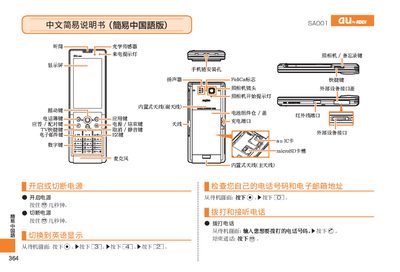
The SA001 phone manual provides a quick‑start guide to the device’s buttons and basic functions. It describes the layout of keys such as the power, answer/pair, TV shortcut, email, numeric keypad, camera, and voice memo keys, as well as indicators like the incoming‑call light, speaker, microphone, and built‑in antennas.
Step‑by‑step instructions cover making and receiving calls, saving contacts, switching between photo and animation modes, adjusting volume, setting silent mode, and using the voice‑memo feature. Customer‑service contact information is also included. This manual is written in Chinese.
| Primary Antenna | Built‑in |
|---|---|
| Secondary Antenna | Built‑in |
| External Device Interface | Present |
From the standby screen, press the keypad, enter the phone number, and press the call button.
When the phone rings, press the answer button to answer the call.
From the standby screen, press the camera button, hold for a second, then press the capture button to take a photo.
From the standby screen, select the voice‑memo option and follow the prompts to start and stop recording.