
This quick guide introduces how to use the photo scanner.
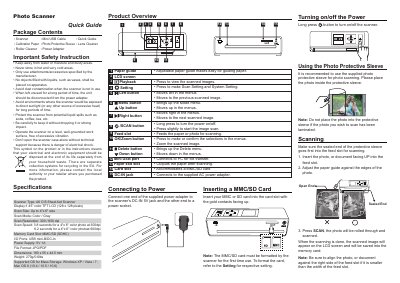
The guide provides step‑by‑step instructions for preparing a photo, inserting it into the scanner, and starting a scan. It also covers how to use the protective sleeve, insert and format an MMC/SD card, and operate the LCD display and buttons.
Additional sections describe connecting the scanner to a PC via the mini‑USB cable, calibrating and cleaning the scanner, and safety precautions such as avoiding moisture, extreme temperatures, and liquid spills. This manual is written in Chinese.
| Scanner Type | A6 CIS Sheet‑fed Scanner |
|---|---|
| Display | 1.45" color TFT LCD (128 × 128 pixels) |
| Scan Size | Up to 4" × 6" |
| Scan Resolution | 300 dpi / 600 dpi |
| Scan Speed | 3.8 s (300 dpi) / 6.2 s (600 dpi) for 4" × 6" photo |
| Memory Card Slot | MMC/SD (SDHC) |
| I/O Ports | USB mini‑B / DC‑In |
| Power Supply | 5 V 1 A |
| File Format | JPG / PDF |
| Dimensions | 180 × 55 × 44.5 mm |
| Weight | 270 g (0.6 lb) |
| Supported OS for Mass Storage | Windows XP/Vista/7, Mac OS X 10.4‑10.6 |
Insert the card, then refer to the Scan Setting menu and select the format option; the scanner will format the card automatically on first use.