
This is a standalone A4 photo scanner with color LCD screen, which supports scanning photos and documents up to A4 size. The scanned images will be saved into the memory card.
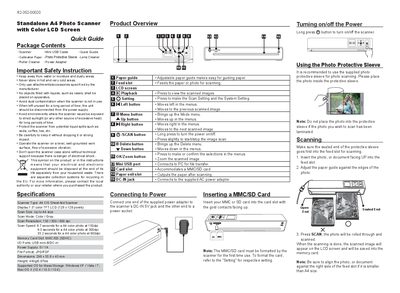
The Standalone A4 Photo Scanner is a sheet‑fed CIS scanner with a 1.5" color TFT LCD, supporting A4‑size photos and documents. It offers color and gray scanning modes, selectable resolutions of 150, 300, or 600 dpi, and stores images as JPG or PDF on an MMC/SD card.
This Quick Guide covers safety instructions, power connection, inserting memory cards, scanning procedures, playback, settings, PC connection, calibration, and cleaning. Follow the step‑by‑step instructions to operate the scanner safely and achieve high‑quality scans.
| Scanner Type | A4 CIS Sheet‑fed Scanner |
|---|---|
| Display | 1.5" color TFT LCD (128 × 128 pixels) |
| Scan Size | Up to A4 size |
| Scan Mode | Color / Gray |
| Scan Resolution | 150 / 300 / 600 dpi |
| Scan Speed (150 dpi) | 8.7 seconds per A4 color photo |
| Memory Card Slot | MMC/SD (SDHC) |
| VO Ports | USB mini‑B / DC‑In |
| Power Supply | 5 V 1 A |
| File Format | JPG / PDF |
| Dimensions | 298 × 55.8 × 45 mm |
| Weight | 440 g (0.97 lb) |
| Supported OS (Windows) | XP / Vista / 7 |
| Supported OS (Mac) | 10.4 / 10.5 / 10.6 |
Long press the © button to turn the scanner on or off.
In the Settings menu choose Format, then select Yes to format all data on the memory card.