
This document introduces the use of the PS-F35 scanner, including how to connect the power supply, insert the storage card, insert the film, scan the photo, and take out the photo.
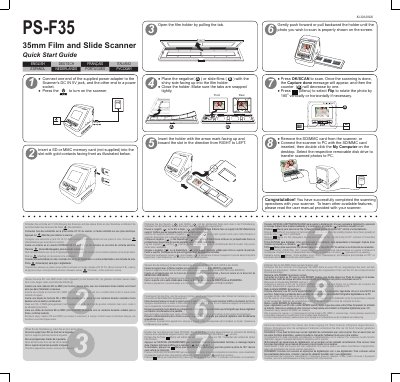
This guide walks you through connecting the supplied 5 V power adapter, inserting an SD or MMC card with the gold contacts facing forward, and loading negatives or slides into the film holder. Once the holder is closed, press OK/SCAN to start scanning; the device will display a "Capture done" message and decrement the counter.
After scanning, you can transfer the images to a PC by connecting the scanner with the card inserted and opening the removable drive. Use the (Menu) → Flip option to rotate images 180° vertically or horizontally if needed.
| Power Input | 5 V DC |
|---|---|
| Supported Memory Cards | SD or MMC |
Connect the power adapter to the DC IN 5 V jack and press the power button.
Insert an SD or MMC card with the gold contacts facing forward into the card slot.
Open the film holder, place the negative or slide with the shiny side up, and close the holder ensuring the tabs snap tightly.