
The document includes specifications and features of micro products.
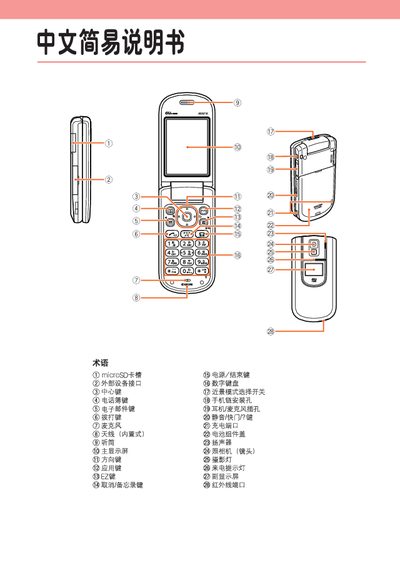
This manual describes basic operation of the A5521K phone, including how to turn the power on and off, register for EZweb services, and configure phone and email settings. It also covers dialing local and international numbers, managing the phonebook, and handling voice messages.
Additional sections explain how to use the built‑in camera for photos and animations, adjust volume, mute the device, and access other functions such as the microSD slot and external connectors. This manual is written in Chinese.
Press and hold the power key for more than one second.
From the standby screen, enter the phone number and press the Call key.
Select "New Email" from the standby screen, enter the recipient address, subject, and message, then press the Send key.
From the standby screen, select the camera, choose Photo mode, and press the Capture key, then press Save.