
This document is a user manual for the SAITEK Pro Flight Rudder Pedals. The product is a 3-axis rudder pedal that can be used with any SAITEK PC flight stick, but is specifically designed to complement the SAITEK X52 flight control system to enhance flight sim experiences. Product features include self-centering pedals with adjustable tension, silent, smooth action for optimum control and precision, toe brakes, tension adjustment, pedals that adjust to fit all sizes and include non-slip materials, high quality, solid construction for long life and advanced SST programming.
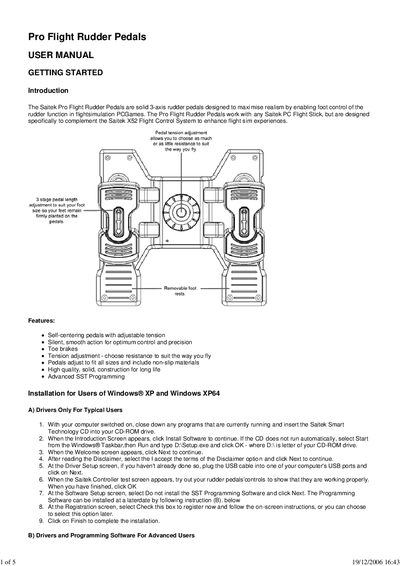
This manual introduces the Saitek Pro Flight Rudder Pedals, a solid 3‑axis foot controller designed for flight‑simulation PC games. It describes the hardware features, such as self‑centering pedals, adjustable tension, toe brakes, and removable foot rests, and explains how to adjust pedal length and tension to suit individual users.
The guide walks you through driver installation for Windows XP, Windows 2000, and advanced SST programming software setup. It also covers game‑specific configuration, testing, and troubleshooting, with a technical support section for further assistance.
| Pedal tension adjustment | adjustable |
|---|---|
| Toe brakes | included |
| Pedal length adjustment | 3 stage |
| Foot rests | removable |
| Material | non‑slip |
Insert the Saitek Smart Technology CD, run the Setup.exe program, follow the on‑screen prompts, and plug the USB cable when asked.
Open the Game Controllers window in Windows, select the Saitek Pro Flight Rudder Pedals, and use the Test tab to move the pedals and observe the response.
Visit the Saitek website (www.saitek.com) and download profiles from the product companion disk or the online profile library.