
This document describes the features and characteristics of the PCI8346B hardware, including 24-channel analog input and 8-channel optically isolated digital input and output functions.
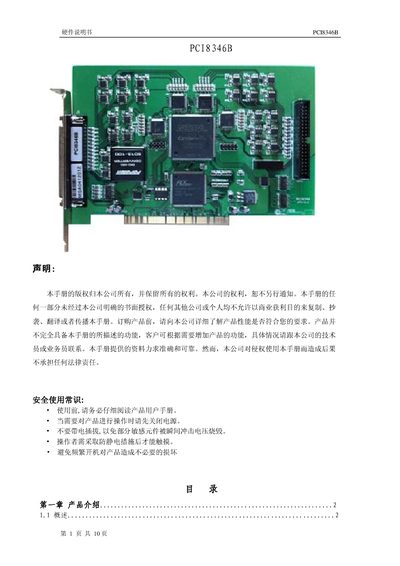
The PCI8346B is a PCI‑bus data acquisition card offering 24 single‑ended analog inputs, 8 optically isolated digital inputs and 8 optically isolated digital outputs. It supports a 16‑bit resolution, up to 450 kS/s per channel, and operates within a temperature range of 0 °C to 60 °C.
The manual includes a product overview, detailed installation steps for Windows systems, testing procedures for analog and digital channels, pin‑out diagrams, connection guidelines, and a troubleshooting chapter that addresses common issues. This manual is written in Chinese.
| Bus type | PCT |
|---|---|
| Analog input channels | 24 single‑ended |
| Analog input resolution | 16 bits |
| Sampling rate | 450 kS/s per channel |
| Input voltage range | -10 V to +10 V, -5 V to +5 V |
| Digital input channels | 8 |
| Digital output channels | 8 |
| Digital level type | Optically isolated 5‑30 V |
| Power consumption | +5 V @ 1.5 A |
| Operating temperature | 0 °C to 60 °C |
| Storage temperature | -45 °C to +150 °C |
| Dimensions | 175.6 mm × 98.3 mm |
| Relative humidity | 40 %–80 % |
It provides 24 single‑ended analog input channels.
Insert the PCI8346B card into a PCI slot, secure it, then run the hardware wizard to install the driver from the supplied CD.
Connect a signal to an AD channel, set the display to “actual value”, and click the “Start” button to see the captured waveform.