
This document introduces the features and characteristics of the multi-function digital PID temperature controller AT48/72/49/96A series, including various input and output methods, alarm function, communication interface, etc.
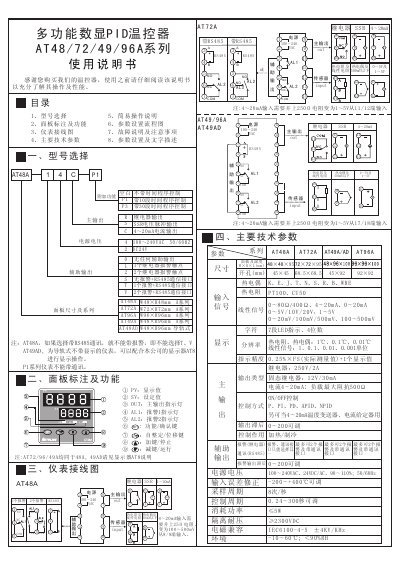
The document provides detailed information on selecting the correct model, interpreting panel markings, and connecting the thermostat. It includes wiring diagrams, technical specifications, and step‑by‑step instructions for basic operation and parameter configuration.
Additional sections cover the self‑tuning procedure, fault diagnosis, alarm settings, and communication options (RS485). Safety and installation recommendations are also included to ensure reliable performance in industrial environments. This manual is written in Chinese.
| Power supply voltage | 100~240 VAC |
|---|---|
| Output type | SSR or 4‑20 mA |
| Temperature measurement range (sensor dependent) | -50 °C to +1700 °C |
In the basic display, press a key for 2 seconds to show the At parameter, set it to ON, then confirm; the thermostat will flash and begin self‑tuning.
Verify the sensor wiring, ensure correct polarity for thermocouples or correct connections for resistance sensors, and confirm the sensor is not broken.
In the basic display, press a key to select the value, then use the +/– keys to adjust; holding the key changes the value faster.