
This document is a quick start guide for iPhone, which provides instructions on setting up and using key features of iPhone, including making phone calls, using FaceTime, sending messages, using smart keyboard, cutting, copying and pasting text, and notifications.
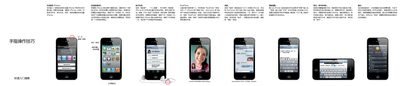
This quick start guide walks you through the initial setup of your iPhone, including powering the device on, navigating the home screen, and configuring basic settings such as ringtone, silent mode, and notifications. It also explains how to create an Apple ID and use iCloud for syncing data.
The guide covers everyday tasks like making calls, using FaceTime video calls, sending iMessage or SMS, typing with the smart keyboard, taking photos and videos, controlling media playback, browsing the web with Safari, organizing apps into folders, and accessing the App Store and iCloud services. Voice Control instructions are also included for hands‑free operation. This manual is written in Chinese.
Press and hold the power button for a few seconds, then slide the on‑screen slider to confirm.
Press and hold the Home button or the central button on the headset until the Voice Control screen appears, then speak your command.