
Temperature and humidity recorder is mainly used to measure temperature and humidity, and is widely used in the storage and transportation of food, medicine and fresh goods, as well as in the industries that meet HACCP system certification, and can also be used in laboratories and other places that need to monitor temperature and humidity. The instrument has the characteristics of stable performance, small size, large amount of recorded information, high accuracy, low power consumption and so on.
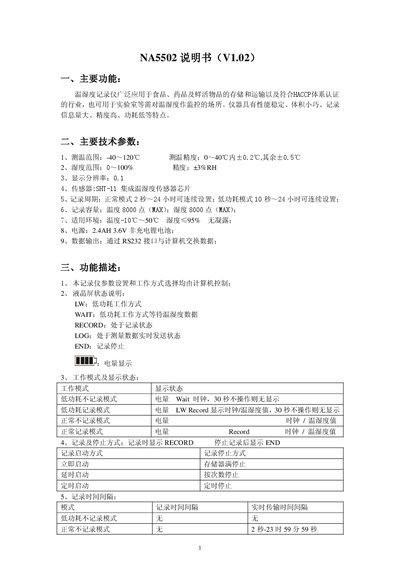
The 1NA5502 temperature and humidity recorder is designed for food, pharmaceutical, and fresh‑produce storage and transport, as well as laboratory monitoring. It offers stable performance, compact size, high recording capacity, and low power consumption.
The manual describes the device’s main functions, technical parameters, operation modes (normal and low‑power), LCD status indicators, key operations, and connection to a PC via RS232 for data transfer. It also lists the package contents and includes a disclaimer from Xinya. This manual is written in Chinese.
| Temperature measurement range | -40 °C to 120 °C |
|---|---|
| Temperature accuracy | ±0.2 °C (0‑40 °C), ±0.5 °C (others) |
| Humidity measurement range | 0 %RH to 100 %RH |
| Display resolution | 0.1 |
| Integrated sensor | SHT‑11 |
| Recording capacity | 8000 temperature points, 8000 humidity points (max) |
| Power source | 2.4 Ah 3.6 V non‑rechargeable Li‑ion battery |
| Data output interface | RS232 |
| Operating temperature environment | -10 °C to 50 °C |
The LCD shows the battery level; when the battery is low the level indicator flashes.
Data are exchanged with a computer via the RS232 interface using the supplied communication cable.
The code “EE” indicates a sensor fault.