
Smartisys IPLIR series infrared learning machine is an important programming tool in the multimedia infrared control system. Its main function is to learn the code of the infrared remote control of the controlled device, and then through programming, burn the infrared code file to the main control unit or interface machine, so that the main control unit or interface machine can directly control the infrared device, so as to achieve automatic control.
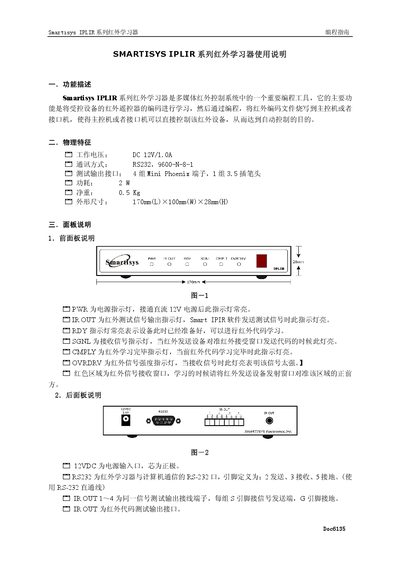
The Smartisys IPLIR series infrared learning device is a programming tool for multimedia infrared control systems. It learns infrared codes from remote controls and writes them to a host or interface unit, enabling automatic control of the target device.
The guide explains physical features, panel functions, connection steps, and software operation with SmartIRrw. It also details how to test and verify learned codes, configure serial ports, and manage code libraries. This manual is written in Chinese.
| 工作电压 | DC 12V 0.71A |
|---|---|
| 净重 | 0.5 Kg |
| 外形尺寸 | 170mm × 100mm × 28mm |
| 通讯方式 | RS232, 9600‑N‑8‑1 |
| 测试输出接口 | 4 groups Wini Phoenix terminals, 1 group 3.5 mm plug |
The RDY indicator stays on to show the device is ready for infrared code learning.
Check that the infrared learner is correctly connected to the computer’s serial port and set the proper serial port parameters.
Use the built‑in test function: select the function name, click “Test”, and observe whether the target device performs the expected action.