
This document is a user guide for fingerprint card readers, providing information on network connections, pin definitions, RS485 networking, and power connections. It also includes wiring diagrams for Wiegand output, Wiegand input, RS485 networking, and power connections. The document also explains the definitions and colors of the DB15 connector pins. Finally, installation precautions and the connection method for the anti-tampering switch are provided.
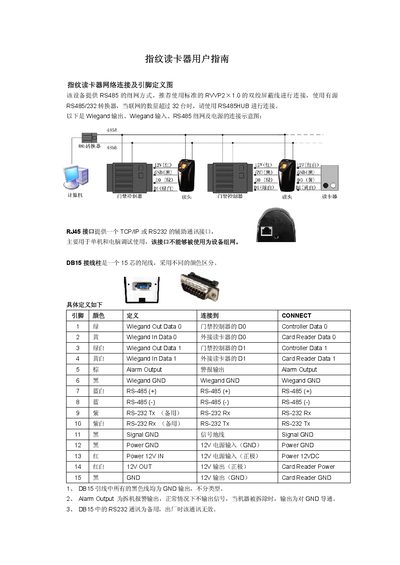
The manual describes the connection options for the fingerprint reader, including RS485 networking with a recommended RVVP2 x1.0 twisted‑shielded cable, Wiegand input/output, RJ45 auxiliary TCP/IP or RS232, and a 15‑pin DB15 connector with color‑coded pins. It also explains the alarm output behavior and the anti‑tamper switch located at the sensor base.
Installation guidelines cover indoor mounting, securing the back‑plate with four mounting holes, and proper handling of power and signal wires. The document lists model variants (F10, F10‑ID600, F10‑ID5000, F10‑ID8000, F10‑SMART) and provides a packing list of accessories and cables. This manual is written in Chinese.
| Fingerprint capacity | 600 (standard), 5000, 8000, unlimited for SMART model |
|---|---|
| Power supply | 12 V DC input |
| Alarm output drive capability | 12 V 300 mA |
| Maximum RS485 devices per network | 32 devices (use RS485 HUB for more) |
| Recommended RS485 cable | Standard RVVP2 x1.0 twisted‑shielded pair |
Up to 32 devices can be networked; for more than 32, an RS485 HUB should be used.
The alarm output is inactive under normal conditions and connects to ground when the device is removed; it provides a 12 V 300 mA signal that can drive an external relay.
Use a standard RVVP2 x1.0 twisted‑shielded pair cable for RS485 connections.
The red‑white line must be cut and insulated with tape to prevent short‑circuiting.