
SWP-LCD-A/M manual manipulator is a manual controller launched by Yongwei Automation for various regulators or computer control systems as a backup instrument. The controller has functions such as automatic to manual without disturbance smooth switching, manual to automatic without disturbance smooth transition, suitable for control occasions that need manual manipulator.
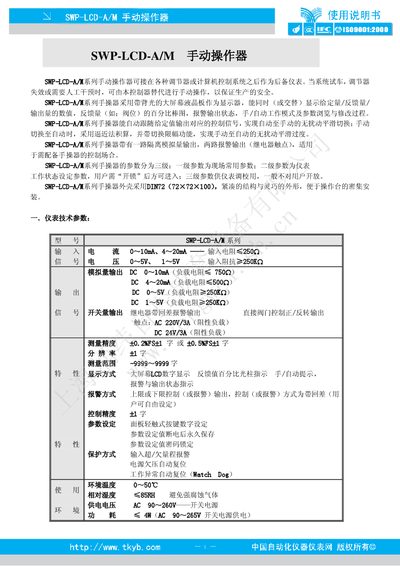
The SWP‑LCD‑A/M manual operation controller provides a back‑lit LCD display for showing set values, feedback values, and output status. It can replace a regulator or computer‑based control system during testing, regulator failure, or when manual intervention is required, ensuring safe production operation.
The device features selectable analog input ranges, isolated analog output, two alarm relays, and supports smooth, disturbance‑free switching between automatic and manual modes. Parameter settings are organized into three levels, with higher‑level parameters protected by a lock code. The manual describes wiring, parameter configuration, and operation of the hand/auto switch, as well as dimensions and optional accessories. This manual is written in Chinese.
| Input current range | 0‑10 mA, 4‑20 mA |
|---|---|
| Input voltage range | 0‑5 V, 1‑5 V |
| Analog output current range | 0‑10 mA (load 750 Ω), 4‑20 mA (load 5 kΩ) |
| Supply voltage | AC 90‑260 V (switching power supply) |
| Dimensions (W×H×D) | 72 mm × 72 mm × 105 mm |
Press the “SET” key for about 5 seconds; the LCD will show “SET” and the indicator bar will light, indicating the device is in parameter setting mode.
Press the hand/auto key; each press toggles the mode, and the LCD shows the corresponding manual or automatic indicator.
The controller has no power switch; once power is connected, it starts self‑checking, displays the software version, and then enters measurement and control mode.