
This document introduces information about LVT, including its characteristics, usage and maintenance methods
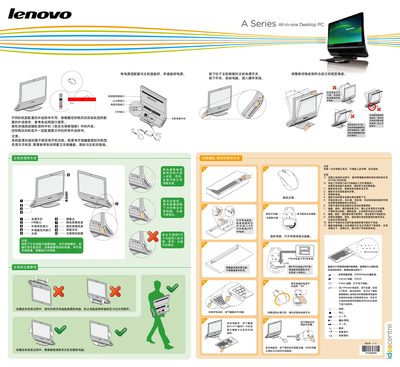
This manual guides you through connecting the power adapter, turning on the computer, and using the built‑in ports such as Ethernet, USB, and TV antenna. It also covers safety and warranty information, and notes that not all accessories shown may be included with every configuration.
Detailed instructions are provided for pairing the wireless keyboard and mouse, replacing the AA batteries, and using the Bluetooth remote control for media, games, and telephone functions. The document includes guidance on screen adjustment, audio controls, and troubleshooting low‑battery indicators. This manual is written in Chinese.
| Effective wireless range | 10 meters |
|---|---|
| Battery type | 2 AA batteries |
| Document version | V1.0 |
After the computer starts, press the keyboard’s Fn+F11 key for about 5‑10 seconds to establish the wireless connection.