
Liquid crystal programming instructions, this programmer supports Samsung NT68 series, Lehua 2025 series, Dingke 2621 series online burning, also supports MSTAR/MYSON/REALTEK series chip online burning, supports Yuekang, Kaixuan, Hongjie series online burning
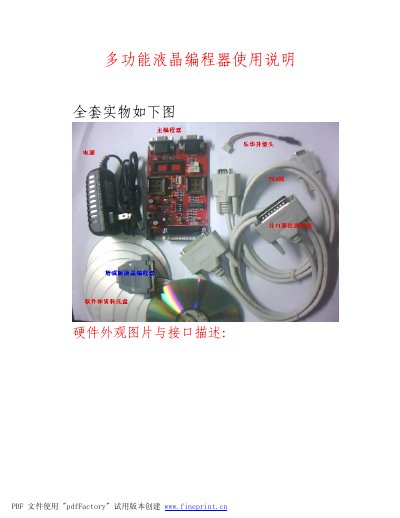
This manual provides a complete overview of the upgraded multifunction LCD programmer, including hardware appearance, connector description, and safety reminders. It stresses proper storage, the consequences of tampering, and the one‑year free warranty.
The guide walks the user through quick‑start procedures, supported chip families, ISP burning connections, software installation (Easy Writer), online and offline programming methods, and detailed adjustment steps for Samsung CRT monitors and 24C EEPROM programming. Technical support contact information is also provided. This manual is written in Chinese.
| Price | RMB 180 per set |
|---|---|
| Warranty | Free one‑year warranty (void if opened) |
| Supported Chip Families | Samsung NT68, MSTAR, MYSON, REALTEK, etc. |
| Programming Modes | Online ISP and offline programming |
The device comes with a free one‑year warranty, but the warranty is void if the programmer is opened or tampered with.
The manual states that lost units will not be replaced and no warranty or support will be provided.
It supports Samsung NT68 series as well as MSTAR, MYSON, REALTEK and other ISP‑compatible chips.
Insert the CD, open the Samsung NF68F programming folder and double‑click “Easy Writer”, then follow the prompts.