
CAN485 User Manual, introduces RS485 interface protocol, interface definition, jumper setting, LED indication, and precautions.
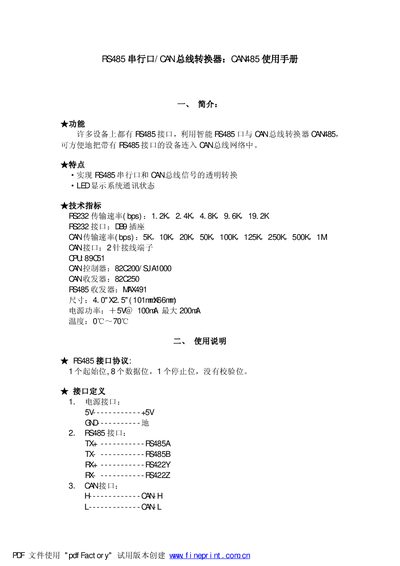
The CAM85 converter provides transparent conversion between RS485 and CAN bus signals. It supports a wide range of baud rates for both interfaces and includes LED indicators for status monitoring.
The manual describes the connector pin assignments, jumper configurations, and operating parameters such as power consumption, temperature range, and supported communication speeds. It also lists the internal components like the CPU, CAN controller and RS485 transceiver. This manual is written in Chinese.
| CPU | 89C51 |
|---|---|
| CAN controller | 82C200 / SJA1000 |
| RS485 transceiver | MW491 |
| Size | 4.0" x 5" (101mm x 66mm) |
| Power consumption | 15 mW @ 100 mA, max 200 mA |
| Operating temperature | 0 °C – 70 °C |
| RS232 baud rates | 1.2 K, 2.4 K, 4.8 K, 9.6 K, 19.2 K |
| RS232 interface | DB9 connector |
| CAN baud rates | 5 K, 10 K, 20 K, 50 K, 100 K, 125 K, 250 K, 500 K, 1 M |
| CAN interface | 2‑pin terminal |
The CAM85 supports RS232 baud rates of 1.2 K, 2.4 K, 4.8 K, 9.6 K and 19.2 K.
The RS485 interface pins are TE (RS485A), TK (RS485B), FE (RS422Y) and RC (RS422Z).
The device operates from 0 °C to 70 °C.