
AW-A3001 embedded door access control manual, introduces the product accessories list, board wiring terminal diagram, main board description, jumper description, indicator light description, operation instructions, technical parameters, interface definition, eight-bit rotary switch description, power on, open door, card download, precautions and other content.
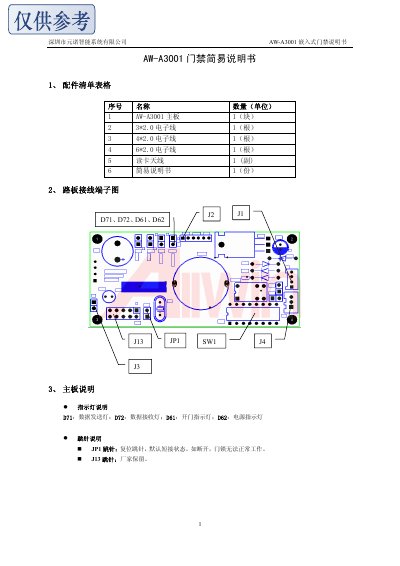
This manual describes the AW‑A3001 embedded access control unit, including a complete accessory list, wiring terminal diagrams, and board indicator functions. It explains the connector pinouts, DIP switch address settings, and operation indicators such as power, data transmission, and door‑open LEDs.
Technical parameters are listed, covering rated voltage, current, dimensions, communication interface (RS‑485 9600 bps), maximum network size (32 devices), compatible card types, read distance, storage capacity, and environmental limits. Installation advice and a typical network topology diagram are also provided. This manual is written in Chinese.
| Dimensions (L×W×H) | 80 mm × 40 mm × 20 mm |
|---|---|
| Rated Current | 280 mA |
| Maximum Network Devices | 32 |
| Compatible Card Types | TI, EM |
| Card Read Mode | Read‑only |
| Sensing Speed | 0.15 s |
| Card Storage Capacity | 1000 cards |
| Clock Function | Yes |
| Output Mode | Dry contact or pulse |
Up to 32 units can be networked together.
The green LED lights when the door is opened.
The address is set using DIP5‑DIP1 switches; the binary value plus one gives the address.